Searching an Issued Item
The Advanced Search Options - Item Issue section lets you search for the items that are issued to a work order or direct charge to perform an asset repair.
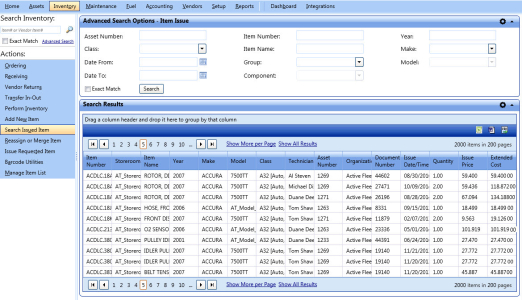
Advanced search options - item issue
To search the issued item
- Click the Inventory module.
- In the Actions section, click Search Issued Item.
- In the Advanced Search Options - Item Issue section, specify the following search parameters:
- In the Asset Number box, type the asset number for which the item is issued.
- In the Class list, select the asset class.
- In the Date From and Date To fields, type the date range when the item is issued in the MM/DD/YYYY format, or select the dates from the calendar.
- In the Item Number box, type the unique item number.
- In the Item Name box, type the item name.
- In the Group and Component list, select the group and component of the asset repair.
- In the Year box, type the year of manufacture of the asset.
- In the Make and Model list, select the make and model of the asset.
- Select the Exact Match check box if you are sure that you have entered the correct text in the Item Number, Item Name, and Asset Number box.
- Click Search.
The Search Results grid displays the items issued along with the following information:
- Item Number
- Storeroom
- Item Name
- Year
- Make
- Model
- Class
- Technician
- Asset Number
- Organization
- Document Number
- Issue Date/Time
- Quantity
- Issue Price
- Extended Cost
|
Navigation Tips:
|


Exporting the Search Results Grid
You can export the information in a column in the following formats:
- Microsoft Excel (.xls)
- Microsoft Word (.doc)
To export the column information
- In the upper-right corner of the List of Columns grid, click the Microsoft Excel (
 ) or Microsoft Word (
 ).
).
The File Download dialog box opens prompting you to Open, Save, or Cancel. - Click Save.
The Save As dialog box is displayed with the File Type of the selected format. - Browse to the desired location, specify a file name, and then click Save.
The List of Columns grid is saved in the specified format at the specified location.