Reassigning or Merging Items
The Reassign or Merge Items section lets you perform the following:
Reassigning Items
The Reassign Items lets you reassign an item that exists in a storeroom to another item that does not exist in any of the storerooms.
|
Note: The FASTER Web does not display the details of the item that is reassigned into another item. |
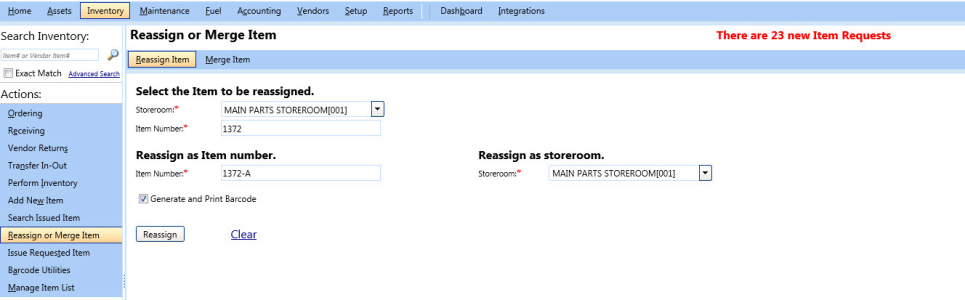
Reassign items
To reassign an item to another item
- Click the Inventory module.
- In the Actions section, click Reassign or Merge Items.
- In the Select the Item to be reassigned section, perform the following:
Note: The Select the Item to be reassigned section lets you enter the details of the item that you want to reassign to another item.
- In the Storeroom list, select the storeroom of the item.
- In the Item Number box, type the item number.
- In the Reassign as Item number section and Reassign as storeroom section, perform the following:
Note: The Reassign as Item number and Reassign as storeroom sections lets you enter the details of the item to which you want to reassign an item
- In the Item Number box, type the unique item number.
- In the Storeroom list, select a storeroom.
Note: Select the Generate and Print Barcode check box if you want to print the barcode of the item.
- Click one of the following:
- Reassign to complete the process.
- Clear to cancel the selections made.
Merging Items
The Merge Items lets you merge the base information of an item into another item. To perform a merge:
- Both the items must exist in the FASTER Web.
- Both the items can belong to the same storeroom or different storeroom.
You can merge an item with another item in case there is a new vendor for an existing item and has a different vendor item number, when the asset is disposed, or when the item is made obsolete. However, among the three items - parts, fuel, and fluid, the fuel items cannot be merged with another fuel item. For example, diesel cannot be merged with ethanol.
|
Note: The FASTER Web does not display the details of the item that is merged into another item. |
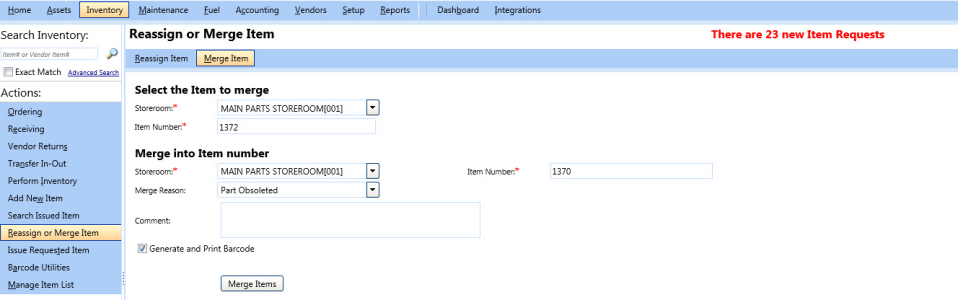
Merge item
To merge an item into another item
- Click the Inventory module.
- In the Actions section, click Reassign or Merge Item > Merge Item.
- In the Select the Item to merge section, perform the following:
Note: The Select the Item to merge section lets you enter the details of the item that you want to merge into another item.
- In the Storeroom list, select the storeroom of the item.
- In the Item Number box, type the unique item number.
- In the Merge into Item number section, perform the following:
Note: The Merge into Item number section lets you enter the details of the item into which you want to merge an item.
- In the Storeroom list, select the storeroom of the item.
- In the Item Number box, type the unique item number.
Note:
You can also perform the following:
- In the Merge Reason list, select a reason to merge the item.
- In the Comment box, type a brief description about merging the item into another item.
- Select the Generate and Print Barcode check box, if you wish to print the barcode of the item.
- Click Merge Items.
- In the Merge Item dialog box, click one of the following:
- Yes, Merge Items to complete the process.
- Cancel to close the Merge Item dialog box.